Showing posts with label learning styles. Show all posts

Practical Ways for Teaching Nonverbal Learners--Come Join Us!

   You are invited to join the conversation between Peggy Ployhar and myself on October 1, 2019 at 8pm (Central Time Zone). We'll be talking about ways you can teach your nonverbal children and teenagers. This conversation is directed at families who homeschool but is relevant to nonverbal learners in the school system as well. Bring your questions about adapting instruction and evaluation and we'll give them our best go!

If you haven't yet seen the awesome website SPED Homeschool sponsoring this event, it's a MUST SEE for families living with special needs. While the target audience is homeschooling families, all families living with disability will find a wealth of information and support at this site. There are articles and videos galore from experts with a wealth of information and personal experience. Many of the topics address issues extending outside the school day, such as incorporating therapy into the day or making religious instruction accessible to kids with a variety of special needs. If you participate in Facebook, SPED Homeschool sponsors some groups that sound pretty fabulous. Take a few minutes to browse the site and you will be impressed.

See you on October 1st!
Rose-Marie

"You're Going to Love This Kid!" A Professional Development Package for Teaching Students with Autism in the Inclusive Classroom

What a privilege it has been to review Paula Kluth’s professional development package for teaching students in inclusive classrooms! The message, the questions, and especially the video footage of children and teachers all hit me in deeply personal, meaningful ways.

You see, genuine inclusion—putting into practice the belief that all students of all abilities belong and can learn—is something that has shaped who I am as a teacher and a parent. I am excited to see this professional development package spread the vision to districts around the country.

From my role as a special educator in a pilot program designed to replace pull-out services by bringing specialized instruction to children within an integrated classroom—to teaching in a general classroom with a parent option allowing me to deliver special services to their students with IEPs—inclusion has impacted my instruction. Enormously!

As a parent, I’ve watched my child with severe disabilities blossom as a valued member participating fully in general classrooms. I’ve also seen her pushed aside in non-inclusive situations that shatter her spirit. The contrast in her life has been dramatic.

Having seen inclusion at work (or not) from so many angles, it is no wonder then that some of the video clips inspired me to cheer inside with joy over the successes...and for my eyes to well up thinking of specific children who don’t know what it is to be included. How deeply I want all children to know, truly know, they are valuable and appreciated and capable of learning.

Paula Kluth is a strong advocate of this vision. That is what the professional development package based on her book “You’re Going to Love This Kid!” inspires.  And it does this by showing inclusion in action, by stimulating discussion, by analyzing what we are doing and what we could be doing better.


If you aren't familiar with Paula Kluth, Ph.D., you are in for a wonderful treat. Her contagious energy and enthusiasm for including kids of all abilities in classrooms where dynamic learning is happening will inspire you. You can catch Paula at Differention Daily and Paula Kluth.com. She shares lots of practical tips at both sites.

While Paula’s development package focuses on children having autism, the message and principles are appropriate for differences of any kind. She offers specific, practical strategies for working with students with autism. It’s amazing how many of these suggestions are excellent practice for teaching any student.

The film includes interviews with teachers, administrators, paraprofessionals, and parents working in a school district where inclusion is embraced as a way of life. It shows students successfully learning and interacting, whether they have disabilities or not.

One thing that stood out for me was the genuine acceptance students held for their classmates with autism and other disabilities. They worked together naturally, comfortably, with respect and kindness. It didn’t come across as something forced for the camera. I do wonder how long the featured schools have been practicing inclusion. Certainly all the students in these videos are going to grow up richer for their inclusive school experience.

Another stand-out for me was seeing the lessons in action. It’s one thing to talk theory; it’s another to see it carried out successfully. These video clips didn’t show perfection, but they did show possibility. You cannot watch these film clips and say that inclusion is an impossible ideal.

Accompanying the video is a facilitator’s guide. It describes how to use the videos, discussions, and handouts for staff trainings of 3 to 12 hours in length. In addition to providing the materials needed to facilitate discussions, it offers a comprehensive list of outside reading and online resources to match each topic.

Several comments in the videos and printed materials stood out as gems in my mind. Others may strike you as particularly meaningful.

--We must ask ourselves, “What can I learn from this student?” This immediately called up a memory of my child’s first grade teacher. At the end of the year, this incredibly gifted teacher thanked me for the privilege of having my daughter in her class, because “she has taught me how to be a better teacher. I have learned more from her this year than during over 30 years of teaching." 

--We are reminded how critical it is to presume competence, especially with children who lack the expressive language skills to demonstrate how much they know.

--The language we use influences our attitudes. If we rephrase challenges in words that put them into a positive light, we are better able to see how to use them to the student’s benefit. For example, by viewing a child's perseverative thoughts as “fascinations” or “passions,” we are more likely to honor the child as an expert on the topic rather than dismiss him as being unteachable in other areas.

--Acknowledge the uniqueness of each child, even within a category of disability. As Paula says, “When you know one child with autism, you know ONE child with autism.”
--Get away from pencil-and-paper lessons. This is more engaging for any student!

--When a child displays challenging behaviors, always ask yourself what the child is attempting to communicate through this difficult behavior. 

If there was one area I would like to have seen developed more fully, I would like the package to address in more detail the issue of state standards. How do teachers individualize expectations for students while working towards state standards that no longer recognize individual needs or abilities? It’s a question that is sure to come up in staff trainings. It’s also one that is bigger than the scope of the development package, and so Paula has recommended some outside resources that would be great to look up.

I finished up the videos thinking, “THIS is what I want for my daughter. She’s had it in the past; this is what I want for her now. For her future.” Isn’t this what any parent would want for their child?

A second thought grabbed my mind... “Is this district taking applications? THIS is where I want to teach!!”

Brookes Publishing has recently released the “You’re Going to Love This Kid!” Professional Development Package at http://www.brookespublishing.com/store/books/kluth-72049/index.htm. For the price of $129.95 US, it’s very affordable for professional development. I do hope that it will be a major component of school staff trainings around the country as students head back to school this fall. Excellent things can happen for our children and their teachers as they work toward the practical vision of inclusion.

Use Visual Timers to Ease Transitions

Have you ever struggled to get your child or students to move from one activity to another? I have!

Take bedtime...that idyllic ritual where small children willingly dress in their pajamas, brush their teeth, and hop into their bunks for a bedtime story. Hah! This is a lovely fantasy of parents-to-be that their children will destroy the moment they are born.

The reality goes a little more like this:

Child is playing with Legos. Mom says, “Time to put the blocks away and get your pajamas on.”

Child whines, protests, refuses to budge from the pile of blocks. Mom starts strategizing. “You have a point. I didn’t give you much warning. IN FIVE MINUTES you need to put the blocks away and dress for bed.” She sets a timer on the stove.

Child happily resumes playing with Legos.

Five minutes later, the timer sounds and mom announces it is time to put the blocks away. She is met with screams and stomping feet.

What went wrong? She tried a very fair strategy.

The problem is that children lose track of time when they are absorbed in an activity. They need a way to judge how much time is left, even if they aren’t proficient in math skills yet.

And that’s where visual timers can help.

Visual timers let kids see how much longer they have for the activity they are doing. Visual timers take away that element of surprise. Unexpected change causes some kids to feel they have no control over their environment and may result in tantrums and melt-downs.


In the event of an activity that a child doesn't like, the visual timer serves as a promise that the dreaded activity will eventually end. Really and for true!

Seeing how much time is left helps children adjust to the idea of change. They may not like that their favorite activity must end, but removing that feeling of suddenness helps them develop control over their response.

What makes a timer visual?

That timer built into the stove or a handheld digital or dial timer is not adequate for most children. It definitely lacks visual support for children with cognitive or sensory disabilities or those who are too young to have much math sense.

A visual timer makes time meaningful by letting children see time passing. Typically, a visual timer will represent time with a pie that gets smaller and smaller as it is used up.

Several excellent visual timers using this “disappearing pie” are available.
A "Time Timer"
Photo by Earthworm on Flickr Creative Commons

TimeTimers ($30-40 at TimeTimer.com or on Linda Hodgdon’s website; approximately $20-30 at Amazon.com) are the classic standard. These come in a variety of sizes appropriate for individual, group, or classroom use.

Wendy Homlish, a respected special educator, shared a source for another visual timer, the elegant Pie Timer for $14. This is good for use with individuals or small groups.

There’s even an app for that, an iTunes TimeTimer ($1.99) with the same visual interface as the physical TimeTimer.

Image from http://itunes.apple.com/us/app/time-timer/id332520417?mt=8
                                              
A great looking countdown timer for the Android includes the Activity Timer ($0.99)

Image from http://www.androidzoom.com/android_applications/productivity/activity-timer_hmet.html

Or the Visual Timer PRO which can count down an hour (the free version is limited to 3 minutes).

Screen shot from http://www.androidzoom.com/android_applications/education/visual-auditory-timer-pro_zawj.html

You can also install visual timers on your computer, whether to set limits to game play or to provide timer feedback.

I especially like the free Countdown Clock from Online-Stopwatch.com. It can be used online or downloaded to use whenever you like. It’s visually similar to TimeTimer and you can apply custom sound add-in to online version. If you want a desktop link to the download, you do have to create your own desktop icon.

The Countdown Clock can run in the corner or full screen

Several bar-style countdown timers might also be useful for older kids or adults.

iTunes offers an Autism Timer ($2.99), with disappearing bars that can change color as the time expires.
A couple timers count down in increments, which some of your kids may find helpful.

The Visual Countdown Timer ($2.99) works on the iPhone by erasing bars as time dwindles.

Focus Booster offers a free download of a bar timer for your computer. The moveable window floats on top of your work. Its timer bar lengthens as time passes, filling the blank window. It is elegant for adults to use and appropriate for an office. It's alarm is fairly soft, which may or may not be a good thing, as it is not currently adjustable.


Jim Luther has created a free incremental CountDown Timer for your computer.

Image from http://sites.google.com/site/jamjolu/Home/countdowntimer


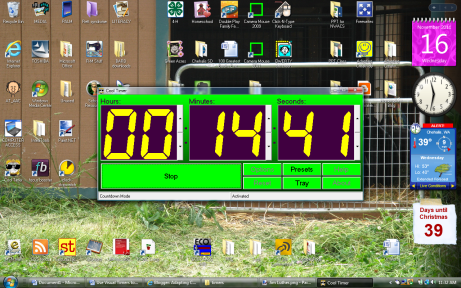
While not providing as much graphic support at these others, Harmony Hollow's downloadable Cool Timer is a nice tool to use on the computer. It's free, has a customizable alarm sound and message banner, and is extremely easy to use. It's away to make sure kids (and adult audiences!) are in their seats when you are ready to start class, especially if you import a goofy sound as the alarm.

 Teachers of kids with autism have been using visual timers for awhile now and seeing excellent results during transitions. These timers can be extremely useful for many populations. If you haven't given them a try, why not do that this week and see if things go more smoothly. I'm betting they will!

Update:  Thanks to our reader Emma for sharing that the free Cool Timer by Harmony Hollow has been upgraded to include a visual countdown feature as well. I'm moving Emma's comment up to the body of the post here, since not everyone reads through the comments. I'm LOVING the upgraded Cool Timer and use it all the time (great for keeping my computer time from encroaching on the rest of my day!). I personally found it easier to download from the CNET site, so take your pick!


Two ways to run Cool Timer. You can
also set it to erase the image rather
than uncover.


AT Considerations for Creating Learning Activities in PowerPoint


So you're ready to roll up your sleeves and jump in with some fancy PowerPoint activities to keep your students engaged...

What should you consider as you create activities in PowerPoint to meet the needs of students with Assistive Technology needs? You want to maximize the effectiveness of the activity AND to minimuze your work.

There are five areas you will address as you design an activity. The time you spend beforehand addressing all five areas will save you headaches later. Trust me.


All five areas are important in creating a successful learning activity.

1. What skill/s do you want to reinforce? Determine what you want your student to gain from the activity. Is your student working on independent reading, increasing independence of study skills, learning cause-effect with switches? 

2.  What are the learning needs of the student?
--Does your student have cognitive or attention issues that limit the number of tasks per page? Should there be fewer responses to choose from?

--Does she need high sensory input to keep her engagement? Visually stimulating colors, movements, and sounds may help direct her attention to the activity.

--Does she need reduced sensory input to prevent overload? Lower the visual complexity, avoid or simplify movements and sounds, make transitions more subtle.

--What needs does the student have for feedback? Should both correct and incorrect choices provide feedback? Or is the student more focused if only correct responses provide reinforcement? Should incorrects disappear so they cannot be chosen again?

--How strongly motivating should reinforcements be?

--Is there a need for auditory support for reading of text or directions?

--Does the student need help slowing down through an activity? If so, you can build in assistance for pacing.

--Consider other learning needs the student may have and include those in your design.

3. What features are needed to match the activity to the student? This is the meat of our PowerPoint series. While PowerPoint is feature-laden (and some of these are pretty spectacular!), only use the ones that match your student’s needs. It’s tempting to go over the top just because you can.

Over the next couple of weeks, we’ll explore the capabilities and ways to incorporate each of the following design elements into PowerPoint activities to meet assistive technology needs:

a.      Transitions
b.      Actions or Hyperlinks
c.       Animations
d.      Magic Invisible Boxes (MIBs)
e.      Trigger Events
f.        Macros and Visual Basic (yes, even in PPT2007)

4. How will students access the activity? PowerPoint can be accessed through any input method your computer can use. Its ability to work well with a touch screen makes it an exciting complement to iPads and other mobile devices. It functions beautifully with mouse input (standard, head, eye control). It also works with keyboards, alternative keyboards, and switches that incorporate key commands. This means it can be used with switch scanning, although it currently takes considerable energy to create scanning activities.

5. How can you simplify the design process? If you have tried creating accessible activities in PowerPoint before, you know how long and involved the process can be. However, there are lots of ways to minimizing time and effort, which I will share with you as we go along. I’ll also provide templates to download and show you how to borrow elements from other PowerPoint activities.

In fact, the first handout for you is a PowerPoint Activity Planning Sheet, which you can download here (note: this is the permanent link that behaves, in case you downloaded earlier from Googledocs and got jibberish). It steps you through these five elements of creating an activity that best meets the needs of your students—and your own need to streamline effort. Don’t worry if some of the terms seem foreign at this point; the Activity Planning Sheet can be handy for recording notes as we go through this series. I’ll post the link with each lesson so you can always find it.

This week, observe your student for cues about ways to support cognitive needs, needs for increased or suppressed visual or auditory stimulation, beneficial types of feedback, and physical access issues. The PowerPoint Activity Planning Sheet will help you organize your thoughts and keep them in mind as we look next time at some of the features that match your student's needs.
If you see other areas of student need to consider in creating a successful PowerPoint activity, please speak up. I know I've missed some but would happily revise the planning tool to reflect a broader student base. Thanks!

* * * * * * * * * * *

Resources for this mini-series:

You can find the PowerPoint Activity Planning Sheet here.

A lesson on Adapting Picture Books for Computer Access using PowerPoint is found here.

Learning Styles: 3 Critical Truths


Ah, learning styles! In the 80’s and 90’s, you couldn’t open an educational journal without finding multiple references to research on learning styles. We discovered some important things about how children and adults process and remember information. We experimented with ways to make the most of these individual strengths in our classrooms. Much of today’s learning theory grew out of what we learned in the 80’s and 90’s. Before we look at three especially important concepts about learning styles, let’s put learning styles into practical terms for parents and those wishing a review. Then we’ll look those three concepts as we consider children with disabilities of all types.
Kindergarten teachers are masters at putting learning style research into action. Consider how they incorporate four learning styles into one activity, learning the letters of the alphabet. The teacher points to the illustrated letters on the wall (visual) as students chant along (auditory) and trace the letters with their fingers in the air (kinesthetic) or on their buddies’ backs (tactile). Four different styles come together in one activity. Surely one style will resonate with a child.
The teacher supports letter mastery throughout the year with dozens of additional activities that expand each learning style. She draws on auditory learning as children listen to alliterative stories and recite theme-letter poems and songs. She provides visual input with student art that emphasizes the letter of the week. The teacher sets up tactile activities with bins of plastic letters to touch and unusual writing tools for students to draw out the letters. She offers kinesthetic learning with variations of beanbag toss and hopscotch games that build on letter knowledge. Each learning style is revisited over and over during the course of the year. Why? What three key truths about learning styles does this teacher know…and why are they so critical to our learners with disabilities?
1) Learning is easiest when we engage our strongest learning style.
When we want kids to catch onto ideas quickly, we need to appeal to their strengths. Students don’t have to work as hard when information is given to them in a form that matches their strongest style. The information naturally makes sense and they can focus on the content of the idea. If we present through a style in which they are weak, they may focus instead on making sense of the presentation rather than the content.
Quick learning has big benefits. It starts the ball rolling for deeper understanding; after all, you have to start somewhere! It builds self-confidence. It gives the teacher immediate feedback as to whether or not a child has grasped an idea, giving her a chance to intervene early on.
If we limit the styles in which we offer information, we might bypass a child’s strength. We might be creating a situation where she is working harder than she needs to. When that happens day after day, children become discouraged and may shut down.


Do your children have opportunities every day to learn in the style that is most comfortable for them?
2) Learning is deepest (therefore most likely to be remembered) when we engage in a variety of styles.
When we want learners to develop deep connections and memories about an idea, we need to give them opportunities to process that information in many modes. If children are going to remember a concept, they must build understanding across many neural connections. Asking them to stretch their learning of the concept through styles that are not their strength will develop those connections. This will give them fuller, richer understanding of the idea and the ability to call it up in a wider variety of situations. A child who can recall math facts auditorily or visually will have an easier time progressing to harder math concepts than the child who must calculate the answer kinesthetically on his fingers.
If we settle on just one style for presenting and practicing information, we deprive children of the opportunity to develop deep understanding. Their knowledge will continue to be superficial. Surface knowledge is quickly forgotten. We need to provide kids with chances to build rich networks that support memory.


Do your children have opportunities to strengthen their learning each day, pushing outside their preferred learning style?


3) We cannot make assumptions about learning styles based on disabilities.

A child's disabilities do not excuse us from providing learning experiences across all styles. We cannot assume that because a physical skill is underdeveloped that the brain does not crave the learning input it provides. We are responsible to offer the full variety of learning style opportunities regardless of disability. This way all children can benefit both from the ease of learning by their strengths and from the rich learning developed when they must explore an idea across all styles.
Let me share some examples:
  • A child who does not walk may still learn kinesthetically. He may learn counting order best to the rhythm of the swing in the physical therapist’s office. He may need assistance tossing a lower-case “t” beanbag at a capital “T” target, but all the letter-learning surrounding that toss may become focused in his mind as his body engages in the physical activity.
Side note:  I strongly suspect that the cadence in music mimics kinesthetic input for children with gross motor issues. Let’s use music to our advantage in teaching. It may actually support two learning styles:  auditory (of course) and kinesthetic.
  • Another example I can offer comes from my own daughter. As an infant and early toddler, she still had the ability to use her hands to explore the world. She did this all day long, scritching unique bumpy textures, rubbing smooth ones, burying her hands deep into soft fur. She was clearly a highly tactile learner! Fast forward a year and her hand use had deteriorated completely. She no longer has voluntary use of her hands. Does this mean she is no longer skilled at processing tactile information? No, it only means she cannot command her hands to perform; her feedback from her hands is unchanged. She continues to deserve the opportunity to learn information in tactile ways.
  • Students with learning disabilities benefit tremendously from learning through a wide variety of learning styles. It is not at all unusual for a subject to "click" when a traditionally visual or auditory subject (such as reading) is taught though tactile or kinesthetic activities. Once the basic understanding develops, then students can expand their learning through more traditional teaching modes.
Sometimes we can figure out a way to work around a physical issue, such as providing music with a strong beat to support kinesthetic input or giving deaf students the chance to feel--physically--the throb of a deep base drum. We can provide hands-on or equipment-supported physical assistance for kinesthetic or tactile input.
Sometimes students present challenges in teaching through a specific style that may be difficult to overcome. We can offer tactile alternatives to blind students, for example, but this does not address their visual learning. It may be that there are no visual alternatives we can offer. Instead of becoming discouraged, we need to think creatively and to insure that we are providing an abundance of opportunities in the remaining learning styles.
We do this because we want to insure that at some point every day, the child has a chance to learn easily through their strengths. We want our children to feel self-confident, regardless of disabilities. We must provide multiple styles of practice every day so kids can develop deep connections and lasting memory of an idea. Teaching across a wide variety of learning styles helps to level the playing field for our students.
Do your children have opportunities to learn through all styles regardless of physical or learning disabilities? If not, how can you expand those opportunitites?


I'd love to hear what you do in your home or classroom to support your child's learning style needs.